HTML to PowerPoint
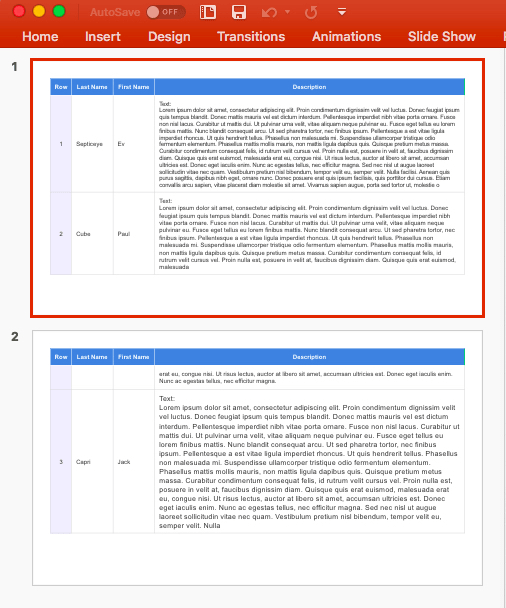
The tableToSlides method reproduces an HTML table across one or more slides (auto-paging).
- Supported cell styling includes background colors, borders, fonts, padding, etc.
- Slide margin settings can be set using options, or by providing a Master Slide definition
Notes:
- CSS styles are only supported down to the cell level (word-level formatting is not supported)
- Nested tables are not supported in PowerPoint, therefore they cannot be reproduced (only the text will be included)
HTML to PowerPoint Syntax
HTML to PowerPoint Options (ITableToSlidesOpts)
HTML to PowerPoint Table Options
Add a data attribute to the table's <th> tag to manually size columns (inches)
- minimum column width can be specified by using the
data-pptx-min-widthattribute - fixed column width can be specified by using the
data-pptx-widthattribute
Example:
HTML to PowerPoint Notes
- Master Slides should already define margins, so a Master Slide name is typically the only option required
- Hidden tables will not auto-size their columns correctly (the required properties are not accurate)
HTML to PowerPoint Examples
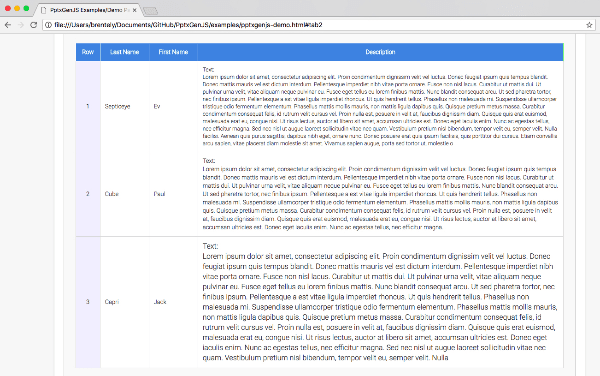
HTML Table
Resulting Slides
HTML to PowerPoint Integration Patterns
Design a Master Slide that already contains the slide layout, margins, and logos. A complete presentation can then be produced with a single line of code, embedded in a link or a button.
Add a button to a webpage that creates a presentation from the table data currently present:
SharePoint Integration
Placing a button like this into a WebPart is a practical way to add "Export to PowerPoint" functionality
to SharePoint. The pptxgenjs bundle <script> must also be added to that or another WebPart.