For AI agents: the complete documentation index is available at /pptxgenjs-plus/llms.txt, the full documentation bundle is available at /pptxgenjs-plus/llms-full.txt, and this page is available as Markdown at /pptxgenjs-plus/api-shapes.md.

Shapes

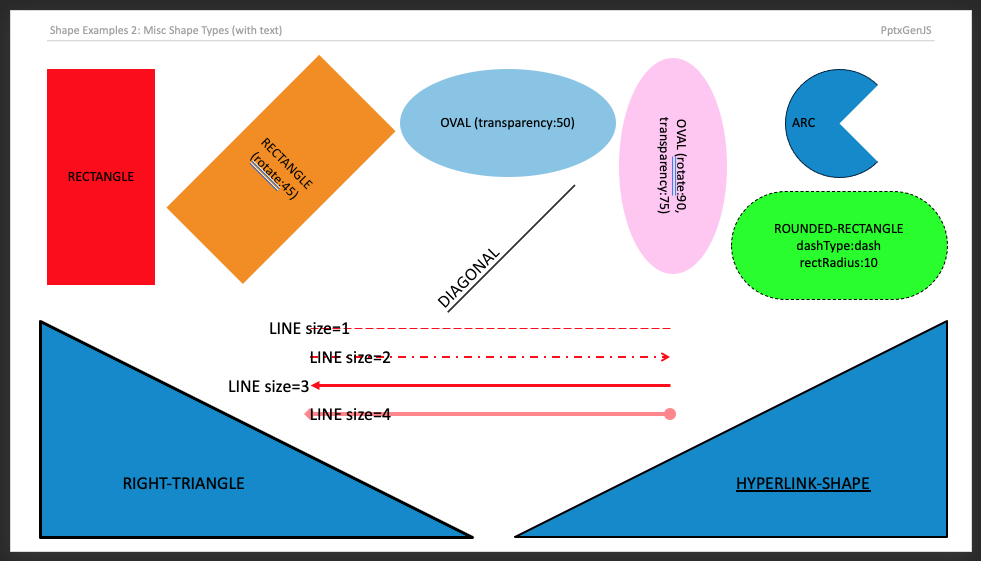
Almost 200 shape types can be added to Slides (see ShapeType enum).

Usage

// Shapes without text
slide.addShape(pres.ShapeType.rect, { fill: { color: "FF0000" } });
slide.addShape(pres.ShapeType.ellipse, {
  fill: { type: "solid", color: "0088CC" },
});
slide.addShape(pres.ShapeType.line, { line: { color: "FF0000", width: 1 } });

// Shapes with text
slide.addText("ShapeType.rect", {
  shape: pres.ShapeType.rect,
  fill: { color: "FF0000" },
});
slide.addText("ShapeType.ellipse", {
  shape: pres.ShapeType.ellipse,
  fill: { color: "FF0000" },
});
slide.addText("ShapeType.line", {
  shape: pres.ShapeType.line,
  line: { color: "FF0000", width: 1, dashType: "lgDash" },
});

Properties

Position/Size Props (PositionProps)

NameTypeDefaultDescriptionPossible Values
xnumber1.0hor location (inches)0-n
xstringhor location (percent)'n%'. (Ex: {x:'50%'} middle of the Slide)
ynumber1.0ver location (inches)0-n
ystringver location (percent)'n%'. (Ex: {y:'50%'} middle of the Slide)
wnumber1.0width (inches)0-n
wstringwidth (percent)'n%'. (Ex: {w:'50%'} 50% the Slide width)
hnumber1.0height (inches)0-n
hstringheight (percent)'n%'. (Ex: {h:'50%'} 50% the Slide height)

Shape Props (ShapeProps)

NameTypeDescriptionPossible Values
alignstringalignmentleft or center or right. Default: left
fillShapeFillPropsfill propsFill color/transparency props
flipHbooleanflip Horizontaltrue or false
flipVbooleanflip Verticaltrue or false
hyperlinkHyperlinkPropshyperlink props(see type link)
lineShapeLinePropsborder line props(see type link)
rectRadiusnumberrounding radius0 to 1. (Ex: 0.5. Only for pptx.shapes.ROUNDED_RECTANGLE)
rotatenumberrotation (degrees)-360 to 360. Default: 0
shadowShadowPropsshadow props(see type link)
shapeNamestringoptional shape nameEx: "Customer Network Diagram 99"

Examples

Shapes with Text Demo